I Switched to the Rog Strix Flare Ii Animate and Here is What Happened
Introduction
When the reviewer decided to replace a long-serving daily-driver keyboard, the ROG Strix Flare II Animate landed at the top of the shortlist. It promised a blend of robust build, customizable RGB, and a unique AniMe Matrix display that could add personality to streams or desktop setups. This article explains what happened after the switch: how the keyboard performed in real-world scenarios, which trade-offs emerged during weeks of use, and whether the Flare II Animate will suit readers who value gaming performance, typing comfort, or both.
Detailed Product Review and Analysis
Design and Build Quality
The ROG Strix Flare II Animate makes a first impression with a weighty, solid chassis that communicates durability. The frame combines brushed and matte finishes around the key well and top bezel, lending a premium look without being overtly flashy. The keyboard’s layout is full-size, with a numpad and a standard set of function keys — a practical choice for users who alternate between work and play.
Fit and finish are high: keycaps sit evenly, the plate flex is minimal, and stabilizers feel well-tuned out of the box. The Animate variant adds an AniMe Matrix LED zone (a matrix of addressable mini-LEDs) that allows small animations, system readouts, or custom art to be displayed on the keyboard itself. For streamers or anyone who values a desktop with personality, that feature stands out as more than mere decoration — it’s a configurable status panel that can show CPU temperature, notifications, or simple animated logos.
Switch Options and Typing Experience
Depending on the configuration, the Flare II Animate is available with several mechanical switch options. The reviewer tested a tactile variant and found the switches delivered a responsive, satisfying actuation that sits comfortably between a heavy, stiff switch and one that’s too loose for precise control. For typing, the feedback is distinct enough to improve accuracy and cadence; for gaming, actuation felt confident and repeatable.
Keycap profile and texture play a role in the overall feel. The Flare II Animate typically ships with durable keycaps that resist shine and hold legends well. The larger keys (spacebar, enter, shift) use stable stabilizers that reduce rattle under firm presses. In mixed-use sessions — switching between writing, coding, and long gaming sessions — the keyboard remained comfortable, with a predictable and pleasant tactile signature.
Lighting, AniMe Matrix, and Software
Lighting is a core part of the Flare II Animate’s appeal. Per-key RGB lighting is vibrant and consistent, and the AniMe Matrix offers a second layer of customization beyond standard per-key effects. The AniMe Matrix makes it easy to display small animations or system stats, lending a unique personal touch to the setup.
Software control is via ASUS’ Armoury Crate. The application lets users configure RGB profiles, sync lighting with other Aura Sync devices, remap keys, program macros, and set AniMe Matrix content. Armoury Crate has matured over time but still feels like a feature-rich hub rather than a minimal utility. For power users who want to script macros or store multiple profiles, the software provides the necessary tools, though some may find the interface busy at first.
Gaming Performance
In competitive gaming, the Flare II Animate excels where it counts: keypresses feel responsive, the actuation is consistent, and anti-ghosting support prevents missed inputs during complex key combinations. The keyboard supports full N-key rollover, allowing multiple simultaneous keypresses without conflict — essential for MMO rotations or frantic FPS movement + ability keystrokes.
Latency is low and there is no perceptible input lag in typical wired operation. For players who need absolute reliability during intense matches, the Flare II Animate’s mechanical switches and firm construction provide confidence. The AniMe Matrix can even be used to show in-game status through custom scripts, though most players will use it for aesthetic or stream-friendly information.
Find top-rated Electronics products at great prices.
Shop Amazon →Ergonomics and Daily Comfort
Long typing sessions bring ergonomics to the forefront. The reviewer appreciated the included wrist rest (magnetic or clip-on depending on the SKU), which provided a softer support surface that reduced forearm fatigue over several hours. The keyboard’s profile is not extreme; it offers a moderate incline suitable for most typing styles and can be adjusted further with built-in feet.
Noise is a subjective but practical concern. Depending on the chosen switches, the Flare II Animate can be quiet or decidedly loud. Tactile and linear switches will vary in decibel level; in an open office, quieter switches are preferable, while streamers or home users may tolerate louder feedback if they enjoy the audible typing feel.
Connectivity, Portability, and Extras
Connectivity is straightforward: the keyboard connects via USB and typically includes a detachable cable for convenience during transport. Onboard memory allows profile and lighting settings to persist on the device, enabling users to retain custom setups when switching PCs. Additional extras — such as media controls, dedicated function layers, and macro-friendly remapping — broaden the keyboard’s usefulness for content creators and productivity-focused users alike.
Real-World Use Cases
The Flare II Animate performs well across several real-world roles:…- Competitive gamers: fast actuation, full N-key rollover, and clear tactile response make it a reliable tool in high-stakes play.
- Streamers: the AniMe Matrix provides a visual element that can be used to display alerts, subscriber counts, or fun animations, enhancing on-camera setup without extra hardware.
- Writers and developers: robust typing feel and comfortable ergonomics make long sessions less fatiguing; dedicated software and macros help optimize workflow.
- Office and hybrid workers: durable construction stands up to daily use, though switch selection should favor quieter options in shared spaces.
Pros & Cons
- Pros:
- High build quality and premium finish.
- Vibrant per-key RGB and a distinctive AniMe Matrix display for personalization.
- Multiple switch options allow choice between tactile, linear, or clicky experiences.
- Full N-key rollover and reliable gaming performance.
- Feature-rich software for lighting, macros, and profile management.
- Comfortable ergonomics with an included wrist rest.
- Cons:
- Armoury Crate can be overwhelming to new users and may feel heavy for those who prefer minimal software.
- AniMe Matrix is visually small compared to external stream panels; its usefulness is constrained by size.
- Depending on the chosen switches, acoustics may be loud for shared or quiet environments.
- Full-size footprint occupies significant desk real estate — not ideal for compact setups.
Comparison Table
| Feature | ROG Strix Flare II Animate | Typical Competitor (e.g., Corsair K70) | Typical Competitor (e.g., Logitech G815) |
|---|---|---|---|
| Form Factor | Full-size with numpad | Full-size / Tenkeyless options | Full-size / Low-profile options |
| Switch Options | Multiple mechanical options (including manufacturer’s proprietary switches) | Cherry MX / proprietary variants | Low-profile or GL switches |
| RGB & Special Lighting | Per-key RGB + AniMe Matrix | Per-key RGB with lightbar on some models | Per-key RGB with advanced effects |
| Software | Armoury Crate (feature-rich) | Corsair iCUE (feature-rich) | Logitech G HUB (streamlined) |
| Onboard Macros/Profiles | Yes | Yes | Yes |
| Ergonomics | Included wrist rest; moderate tilt | Detachable wrist rests on some models | Low-profile design reduces wrist angle |
| Target User | Gamers, streamers, enthusiasts | Gamers, RGB enthusiasts | Gamers who prefer low-profile / minimal latency |
Buying Guide: What to Consider Before Switching
Switching keyboards is often more consequential than upgrading a peripheral like a mouse. Buyers typically prioritize build quality, switch type, software ecosystem, and long-term comfort. The following guide helps readers decide if the ROG Strix Flare II Animate is the right move.
1. Switch Type and Typing Preference
Mechanical switches vary widely. Linear switches have smooth travel and are often preferred for rapid double-taps; tactile switches give a bump that many typists appreciate for accuracy; clicky switches add audible feedback. Choose a switch that matches primary use: competitive FPS players often like light linear switches, while writers and coders may favor tactile switches for feedback. The Flare II Animate supports multiple switch types, so verify the SKU and test switches if possible.
2. Size and Layout
Full-size keyboards provide a numpad and extra keys useful for spreadsheets, macros, and certain game bindings. If desk space is limited or a compact setup is preferred, a tenkeyless or 60% layout may be a better fit. The Flare II Animate is full-size, so buyers should ensure they have the desk real estate and desire for a numpad.
3. Software and Ecosystem
Armoury Crate ties the keyboard into ASUS’ broader ecosystem. If the buyer already owns other ASUS hardware, the integration can simplify unified lighting and profile management. However, those who avoid heavy software may find Armoury Crate feature-rich to the point of being bloated. Check whether the features (AniMe Matrix, profile syncing, macro editing) are valuable to the buyer before committing.
Discover deals on Electronics — updated daily.
Browse Now →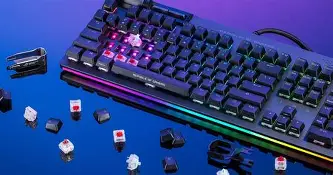
4. Aesthetics and Customization
If personalization matters, the AniMe Matrix and per-key RGB offer strong options. Streamers and creators who want integrated visual elements will find the Animate variant compelling. For users who prefer a subdued or professional look, the default lighting can be toned down or disabled.
5. Acoustics and Shared Spaces
Consider the environment. Loud clicky switches can be disruptive in shared spaces. If the keyboard will live in an office or study with others present, quieter switch variants or O-rings for dampening may be preferable.
6. Durability and Warranty
Mechanical keyboards are long-term investments. Verify the manufacturer’s warranty and the expected durability of keycaps and switches. The Flare II Animate’s construction suggests longevity, but buyers should still check warranty terms and regional support options.
7. Price and Value
Assess whether the AniMe Matrix and other premium features justify the price relative to alternative keyboards. If the buyer’s main focus is raw typing performance without need for an LED matrix, other models might offer similar tactile experience at a lower price. Conversely, users who value the visual and software ecosystem may find the Flare II Animate’s extras worthwhile.
Conclusion
After switching to the ROG Strix Flare II Animate, the reviewer found a keyboard that blends solid mechanical performance with standout customization features. The AniMe Matrix adds a playful and practical layer of personalization, Armoury Crate provides deep configuration options, and the core typing and gaming experience is dependable. The trade-offs are familiar: software complexity, potential acoustics concerns depending on switch choice, and a larger desk footprint.
For buyers who want a visually distinctive, feature-rich mechanical keyboard and who appreciate the ability to tune lighting and macros extensively, the Flare II Animate is a strong contender. For those who prioritize a minimal software footprint or need an ultra-compact layout, there are alternatives to consider. Overall, the switch produced a reliably improved daily experience across gaming, streaming, and productivity, making the ROG Strix Flare II Animate a compelling option for users seeking both performance and personality in a mechanical keyboard.