Mechanical vs Membrane Review: Performance, Price, and Verdict
Introduction
I've been using both a mechanical keyboard and a membrane keyboard as my daily drivers for several months. I bought them with different intentions: the mechanical for long typing sessions, coding, and gaming; the membrane for casual office work and to have a quieter, lower-cost option on my desk. What I found was a lot more nuanced than the simple "mechanical = better" takeaway I expected when I started. In this article I’ll walk you through my hands-on experience, the measurable differences I noticed, and practical advice if you're deciding which type to buy.
What I tested
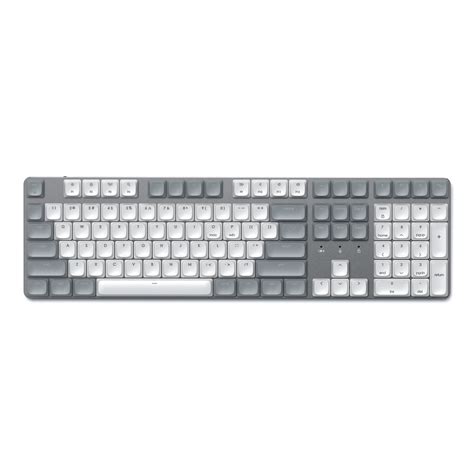
To keep things clear, when I say "mechanical" I mean a compact tenkeyless keyboard with tactile mechanical switches (around a 55–60 g actuation force, tactile bump), PBT keycaps, and a solid metal top plate. When I say "membrane" I mean a full-size office keyboard with a rubber-dome membrane under each key, low travel, and a plastic chassis. I used each keyboard for about six months: the mechanical for programming, long-form writing, and multiplayer gaming; the membrane for emails, spreadsheets, video calls, and casual browsing.
First impressions and build quality
Out of the box, the mechanical keyboard immediately felt more substantial. It had weight to it, a firmer keycap finish (PBT), and a satisfying crispness to the case. Over time that initial impression mattered — the mechanical stayed rock-solid on my desk and didn't flex or wobble when I typed fast. The membrane felt lightweight and a bit hollow by comparison. For basic office use it was fine, but as someone who rests their wrists on the board, I noticed the membrane's plastic gave a little under palm pressure.
One thing I appreciated with the mechanical was the ability to swap things: keycap replacements, detachable cable, and even the option to eventually change switches on a hot-swap board. The membrane had none of that — it was a buy-and-use device with limited lifespan and almost no customization.
Typing feel and noise
Typing is where the two diverged most dramatically. The mechanical keys had a distinct tactile bump and a snappy return that made long typing sessions feel less fatiguing to me. I found my typing accuracy improved slightly because I could feel the actuation point. However, that tactile satisfaction came at a cost: noise. Even with tactile (non-clicky) switches, the mechanical produced a louder, fuller sound than the membrane. I started using a desk mat and a wrist rest to dampen the acoustics — that helped, but you won't make a mechanical as quiet as the membrane without additional mods.
The membrane keyboard was quiet and soft. It felt cushioned and muted each keystroke. For early-morning typing or calls where I don't want to distract others, the membrane was noticeably kinder to the room. However, after a few months of heavy typing I found it slightly mushy — the keys don't rebound as crisply and there's less feedback to tell you a keystroke registered until you see it on-screen.
Performance in day-to-day use
For my programming and creative writing work, the mechanical clearly felt superior. I could maintain speed across long sessions without wrist strain, and the feedback helped me keep a consistent rhythm. For gaming, the mechanical's faster actuation and n-key rollover made a real difference in fast-paced matches — I noticed fewer missed inputs and a more confident movement in games that require quick key combos.
For office-focused tasks—emails, spreadsheets, video conferencing—the membrane was perfectly adequate. The quieter profile made phone and video calls more comfortable for others in my house. The one place the membrane hurt productivity was when I needed to type long documents quickly; my wrists tired sooner and my error rate crept up.
Discover deals on Electronics — updated daily.
See Deals →Durability and maintenance
After six months, the mechanical still felt practically new. The PBT keycaps resisted shine and oil, and the switches showed no sign of wear. Mechanicals generally advertise tens of millions of keystrokes per switch, and while I can't verify long-term lifespan yet, the build felt robust. I did have to clean between keycaps once — removing a couple of keycaps and using compressed air and a gentle brush was easy to do.
The membrane started to show subtle signs of wear sooner. Some keys developed a softer, slightly looser feel after heavy daily use; the travel felt diminished on a few commonly used keys. Cleaning the membrane was easier in one sense — you can't remove individual key switches, so occasional surface cleaning and disinfectant wipes worked. However, if a key's dome loses its elasticity or a membrane layer fails, the whole keyboard generally needs replacement.
Price and value
Mechanicals cost significantly more upfront. I paid more for mine, but I treated it like a long-term tool. For someone who types for hours every day, I felt the premium was justified. The membrane cost far less and felt like a lower-risk purchase for casual or shared use. If you're on a tight budget or need a keyboard to put in a common area or conference room, a membrane is a good value.
Pros & Cons — Mechanical
- Pros: Excellent tactile feedback, durable build, customizable (keycaps, switches, layout), better fo…
1. How much do you type, and for how long?
In my experience, if you type for multiple hours every day—coding, writing, data entry—the tactile feedback and ergonomics of a mechanical keyboard paid off. I felt less wrist fatigue and more consistent typing. If your keyboard time is an hour or two daily, a membrane can be perfectly adequate.
2. Do you share a workspace or have frequent calls?
If you often take calls in the same room or share a desk, the membrane's quieter profile is a big advantage. I used the membrane in my home office during week-long client calls and appreciated the reduced retroactive noise. If you want the mechanical but need quiet, consider low-profile or silent switches and a desk mat to dampen sound.
3. Is customization important to you?
I value being able to change keycaps and try different switches. If you like tinkering, a hot-swap mechanical is the way to go. Membranes offer almost no customization beyond keycap replacements (which are often non-standard) and stickers.
4. What's your budget and expected lifespan?
Mechanicals cost more upfront but feel like an investment. I expect to keep mine for years and possibly mod it later. Membranes are more disposable: if you value low cost and minimal commitment, they’re sensible.
Shop the latest Electronics picks on Amazon.
Browse Now →5. Do you need gaming performance?
For fast gaming I noticed the mechanical's advantage in responsiveness and anti-ghosting. If you're a casual gamer, membrane will do; for competitive play, the mechanical gave me a tangible edge.
Specific features to look for (my checklist)
- Mechanical: switch type (tactile vs linear vs clicky), PBT keycaps, hot-swap PCB if you want future upgrades, detachable USB-C cable, backplate material (aluminum preferred), and whether it has dedicated media keys or a volume roller.
- Membrane: low-profile design for ergonomics, spill resistance, full-size vs tenkeyless depending on number pad needs, quiet key domes, and whether it has handy multimedia shortcuts.
- Both: wired vs wireless preference (wireless adds latency concerns for gaming), ergonomics (wrist rest or detachable pad), and warranty/support—some manufacturers offer multi-year coverage which matters for long-term use.
Price vs Practicality — how I balanced them
I initially balked at paying more for the mechanical, but over months it became clear the cost was offset by the improved experience during long sessions. The membrane saved money and performed well for the tasks I assigned it: email, meetings, and casual web use. If you can only buy one keyboard and type a lot, I’d spend the extra and get a mechanical. If you need multiple keyboards for shared spaces or budget constraints, a membrane is a sensible complement.
Common concerns and real-world nuances I noticed
One thing that bothered me initially with the mechanical was the noise during late-night typing. I tried several quick fixes: adding o-rings under keycaps (reduced bottom-out noise), swapping to "silent" or linear switches where possible, and using a thick desk mat. These mitigations helped a lot but didn't make it as quiet as the membrane. On the membrane side, I was surprised by how quickly some keys developed a slightly springy, less precise feel after heavy daily usage — a reminder that lower cost often means lower longevity.
Another nuance: ergonomics. A heavy mechanical sits flat and stable, which I liked for long typing sessions. But if you travel or move your keyboard between setups, the membrane's lighter weight and smaller footprint made it easier to carry. I found myself keeping the membrane as a travel keyboard in my laptop bag because I wasn't worried about it sustaining some knocks.
Conclusion
After months of living with both, my verdict is practical and simple: choose the mechanical if you prioritize typing feel, durability, gaming performance, and customization — and are willing to pay more and manage noise. Choose the membrane if you prioritize quietness, low cost, portability, and a no-fuss experience for light to moderate daily use.
Personally, I use the mechanical as my main workstation keyboard because I type and game a lot and I value the long-term feel and customization. I keep the membrane in a different room for casual tasks and for when I need a quiet presence during calls. Both have solid places in my life; which one should be in yours depends on how you use a keyboard day-to-day.