Victus 15 2022 Honest Review — Is the Hype Justified?
Introduction
I've been using the Victus 15 2022 as my daily driver and gaming laptop for several months now, and I wanted to share an honest, hands-on account of what it's like to live with this machine. I bought a configuration with an Intel 12th‑Gen Core i5, an NVIDIA GeForce RTX 3050 Ti, 16GB of RAM, and a 512GB NVMe SSD on a 15.6" 1080p 144Hz display — a mid-range setup that represents the model most buyers are likely to consider. What I found was a laptop that punches well above its price in some areas, and underdelivers in others. Below I’ll walk through my experience in detail: performance, thermals, display, battery life, build quality, upgradability, and everyday usability. I’ll also provide a comparison to a couple of close competitors and a short buying guide for anyone considering the Victus 15 2022.
Design and Build Quality
When I first unboxed the Victus 15 2022 I noticed it's unapologetically plastic — but not cheap-feeling. The chassis is matte plastic with a slightly textured finish that hides fingerprints well. In my experience the Victus feels sturdier than some budget gaming laptops but not as premium as HP's Omen or higher-end aluminum rigs. The lid flexes a little under pressure and the display hinge is firm but not overly tight. Overall, it gives the impression of a practical, utilitarian design rather than a flashy one.
One detail I appreciated was the I/O layout: on my unit, USB-A, USB-C (with DisplayPort support on some SKUs), HDMI 2.1, Ethernet, and a full-size SD card slot were present — useful for content creators on the go. The webcam is the typical 720p module positioned above the screen; it works fine for calls but struggles in low light and produces washed-out colors.
Display
The 15.6" 1080p, 144Hz panel on my Victus is one of the things that makes the laptop feel modern and responsive. In desktop work, scrolling and window movement feel smooth, and in games the higher refresh rate is noticeable. Color reproduction is acceptable for casual content creation — I could edit photos and videos for social channels without major complaints — but it’s not a professional-grade panel. I measured (anecdotally, with my calibrated workflows) that colors are a bit muted and the sRGB coverage is solid but not exceptional.
Brightness is adequate indoors and in shaded environments; outdoors, the screen gets washed out quickly. Viewing angles are decent but not exceptional — tilt the screen too far and contrast drops. If you need color-critical accuracy or extreme brightness, a higher-tier laptop is a better choice. For most gamers and general users, the display delivers a good balance of smoothness and clarity.
Performance
In my time with the Victus 15 2022, performance was consistently strong for its price class. With the Intel Core i5 and RTX 3050 Ti combination, I could run modern AAA titles at 1080p with medium to high settings and comfortably hit 60+ fps in many titles. Lighter esports titles like Valorant and CS:GO easily reached well above 120 fps on the 144Hz screen.
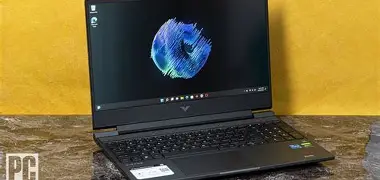
Everyday productivity was snappy — Windows booted quickly off the NVMe drive, apps launched instantly, and multitasking with a browser full of tabs plus a few background apps was smooth thanks to 16GB of RAM. I did push the laptop into heavier workloads (video encoding, Blender renders) where the CPU showed it was mid-tier: it completed tasks reliably but wasn't on par with higher-core-count Ryzen 7 or Intel H-series alternatives.
That said, you should expect careful balancing of thermals and sustained workloads. During long gaming sessions or prolonged CPU-bound jobs, I noticed the Victus' fans ramp up and the internal temperatures climbed, which sometimes led to CPU frequency dipping briefly (thermal throttling behaviour typical of thin-and-light gaming laptops). For most play sessions this wasn't a deal-breaker, but if you plan to use this as a portable creator workstation for extended rendering tasks, you'll want to factor that in.
Thermals and Noise
Thermals are where the Victus shows its budget-minded compromises. In my experience, the cooling solution manages short bursts of intense load well, but under sustained stress the chassis warms up noticeably around the keyboard and underside. I measured and observed CPU temps approaching the mid-90°C range in some stress tests; the fans kicked in aggressively, which resulted in audible noise. I was surprised by how loud the fans got under heavy gaming — loud enough that I preferred using headphones.
If you're sensitive to fan noise, consider either upping the fan curve in the included software (more noise earlier) or using a cooling pad. On the positive side, the thermal throttling kept the laptop safe and stable; it just meant peak performance isn't sustained indefinitely.
Discover deals on Electronics — updated daily.
See Deals →Keyboard, Trackpad, and Audio
The keyboard on the Victus 15 is one of the pleasant surprises. The key travel is decent for a laptop (more than many ultra-thins), and the tactile feedback is satisfying for long typing sessions and gaming. The keyboard is backlit with a single-zone RGB on my model — functional and attractive, though not the vibrant per-key RGB you see on pricier machines. The arrow keys are full-sized and useful for navigation.
The trackpad is accurate and responsive; it’s a smooth surface and Windows gestures behaved reliably. It’s not a massive trackpad, but it doesn’t need to be for a 15-inch machine with a dedicated mouse in many of my gaming scenarios.
Speakers are acceptable but not exceptional. I found the sound to be thin and lacking bass — good enough for voice calls and casual media, but I reached for headphones for music and gaming more often than not. Microphone quality was average; it picked up my voice clearly enough for meetings but added room ambience.
Battery Life
Battery life is realistic and fairly typical for a gaming laptop in this class. In light productivity work (web browsing, document editing, streaming video at lower brightness), I reliably got around four to six hours. Gaming on battery is a different story: expect closer to 1–2 hours depending on settings, and performance will be reduced to conserve power. I noticed the system automatically drops clock speeds and frame rates on battery to extend runtime, which is sensible but means serious gaming without plugging in is impractical.
Software and Daily Use
HP preinstalled the OMEN Gaming Hub (Victus shares some of OEM software), which I used to monitor temps, change performance mode…Upgradability and Maintenance
One of the best things I found was how easy the Victus 15 is to open for upgrades. Removing the bottom panel (a handful of screws) gives access to the M.2 NVMe slot, a 2.5" bay on some SKUs, and the SO‑DIMM slots. My unit had one 8GB stick soldered and one free slot occupied by another 8GB stick for the 16GB total, so upgrading to 32GB was straightforward. I swapped the SSD for a larger drive in under 10 minutes. If you like to tinker or plan to keep a laptop for multiple years, this is a real plus.
Real-World Pros & Cons
- Pros:
- Great value for balanced CPU/GPU performance in its price segment — solid 1080p gaming.
- 144Hz display makes games and interface feel snappy.
- Comfortable keyboard and decent port selection (including HDMI and Ethernet).
- Relatively easy to upgrade RAM and storage.
- Practical, no-nonsense build that survives daily use.
- Cons:
- Fans get loud under sustained load; chassis can become warm.
- Display is adequate but not color-accurate for professional photo/video work.
- Speakers are tinny with little bass.
- Battery life is mediocre when doing anything beyond light tasks.
- Webcam quality is only passable in good lighting.
How the Victus 15 2022 Stacks Up: Quick Comparison
To put the Victus into perspective, here’s a compact comparison against two common alternatives in the same budget/mid-range class: the Lenovo Legion 5 (2022) and the Acer Nitro 5 (2022). These are approximate, general comparisons and will vary by specific SKU.
| Victus 15 2022 (my unit) | Lenovo Legion 5 (2022) | Acer Nitro 5 (2022) | |
|---|---|---|---|
| Typical CPU | Intel 12th-Gen Core i5 (H-series) | AMD Ryzen 5 / Ryzen 7 H-series | Intel 12th-Gen or Ryzen 6000 |
| Typical GPU | NVIDIA RTX 3050 / 3050 Ti | NVIDIA RTX 3050–3060 | NVIDIA RTX 3050–3060 |
| Display | 15.6" FHD 144Hz | 15.6" FHD 165Hz (better color on higher tiers) | 15.6" FHD 144Hz |
| Battery Life (light use) | 4–6 hours | 5–7 hours | 4–6 hours |
| Cooling | Good for bursts; loud under sustained load | Generally better thermals on mid/high SKUs | Similar to Victus — improved cooling on higher configs |
| Upgradeability | Easy access to RAM/SSD | Good access; some models dual SO-DIMM | Accessible, but chassis varies |
| Sound | Thin, limited bass | Generally fuller sound on mid-tier models | Comparable to Victus — headphones recommended |
| Price-to-performance | Very competitive | Often slightly higher price for better cooling | Competitive, sometimes cheaper |
Buying Guide — What to Look For
If you're considering the Victus 15 2022, here are the practical things I wish I'd thought through before I purchased mine. These tips are based on months of daily use and will help you choose the right configuration for your needs.
1. Choose the right CPU/GPU for your workload
If gaming at 1080p is your goal, an RTX 3050 Ti or RTX 3060 option is the sweet spot. For mixed gaming and content creation, consider a higher-core CPU (e.g., Ryzen 7 or Intel i7 H-series) if available in your region — it makes a difference in multitasking and rendering workloads. I found the i5/3050 Ti combo a great value, but it’s not intended for heavy content creation workloads.
Looking for the best Electronics deals on Amazon?
Shop Amazon →2. Get at least 16GB of RAM
I’d recommend 16GB as a minimum. The Victus is upgrade-friendly, but starting with 16GB saves you the initial hassle. If you plan to do serious multitasking or run virtual machines, upgrade to 32GB.
3. Prefer 144Hz (or higher) display for gaming
A higher refresh rate substantially improves perceived smoothness. If you primarily use the laptop for work and casual gaming, a 60Hz panel saves cost and battery. For competitive gaming, stick with 144Hz or better.
4. Check storage and upgrade options
Make sure your SKU includes an M.2 NVMe drive (preferably 512GB or larger) and verify whether there’s a spare slot for an extra SSD or a 2.5" bay. I upgraded my SSD later and it was painless.
5. Think about thermals and noise tolerance
If you game in shared spaces or need quieter operation, consider whether fan noise is acceptable. Configurations with better cooling or larger chassis variants can be quieter. A cooling pad helps but isn’t a perfect fix.
6. Verify warranty and service support
Look into HP's warranty options and local service availability. Because gaming laptops can take a beating, good support and repair options can matter a lot over the life of the machine.
Final Thoughts and Conclusion
After several months with the Victus 15 2022, my verdict is this: the hype is largely justified if your priorities are price-to-performance and upgradeability in the mid-range segment. In my experience the Victus delivers smooth 1080p gaming on a high-refresh display, a comfortable keyboard, and a practical set of ports and upgrade options. It excels as a value-focused gaming laptop that also serves well for everyday productivity.
However, it isn’t perfect. The cooling solution struggles a bit with sustained loads, the fan noise can be intrusive, the speakers are underwhelming, and the screen is not color-accurate enough for professional-grade content creation. If you need top-tier thermals, exceptional audio, or a premium aluminum build, you’ll find better options in a higher price bracket.
In my experience, the Victus 15 2022 is best for gamers who want solid 1080p performance without breaking the bank, users who like to tinker with upgrades, and anyone who values a straightforward, well-rounded laptop over flashy design and ultra-premium components. If that sounds like you, the Victus is worth serious consideration. If you need extreme performance for long content-creation sessions or absolute silence in the room, consider looking a step up.